


Letter Grades
There are two ways to use Letter Grades in Moodle. One method shows Letter Grades, but is actually a scale from 1-13 and, therefore, is not able to do any calculations at all. The other method, the safer way, requires entering number grades and does calculations based on those numbers.
Method 1
If you use the first method, you should ensure that the totals are not shown in User reports.
First, select the Grades link from the main course page.

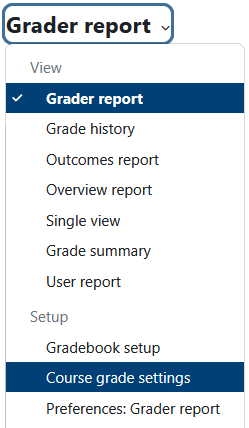
Now select Course grade settings from the dropdown menu near the top right of the page.
Method 2
If you use the second method, you should ensure that grades are shown as letters in User reports. You can also show the number grades alongside them if you wish.
First, select the Grades link from the main course page.
Now select Course grade settings from the dropdown menu near the top right of the page.